Making your way eastward on a sailboat in the Bahamas is a challenge. Sitting squarely in the tradewinds, the prevailing winds in the islands varies from northeast to southeast. Any trip to the east requires either waiting for a break in the winds, or sucking it up and beating into them.
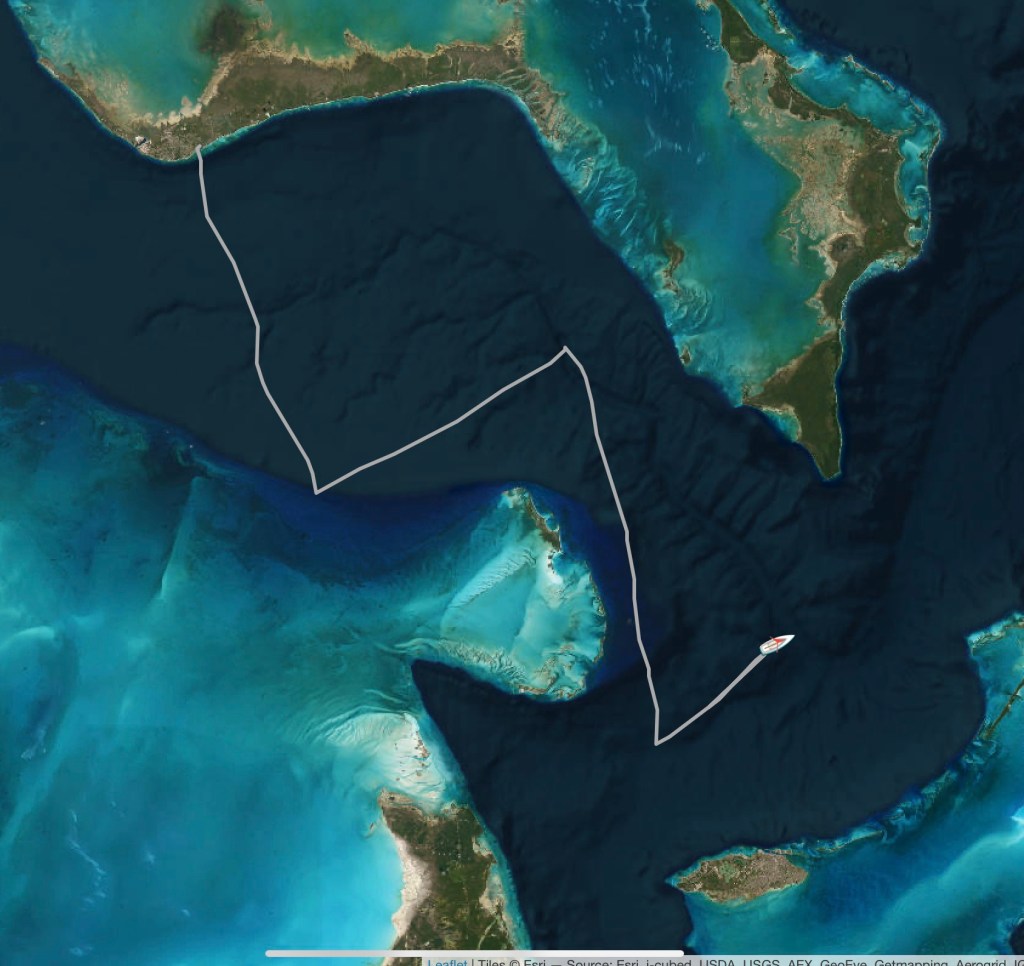
Our usual preference is to wait, and we have, for weeks in some cases. This time we decided to take it on the nose for our voyage from Lucaya to Royal Harbor. The forecast was for winds of 10 to 18 knots, and was very accurate.
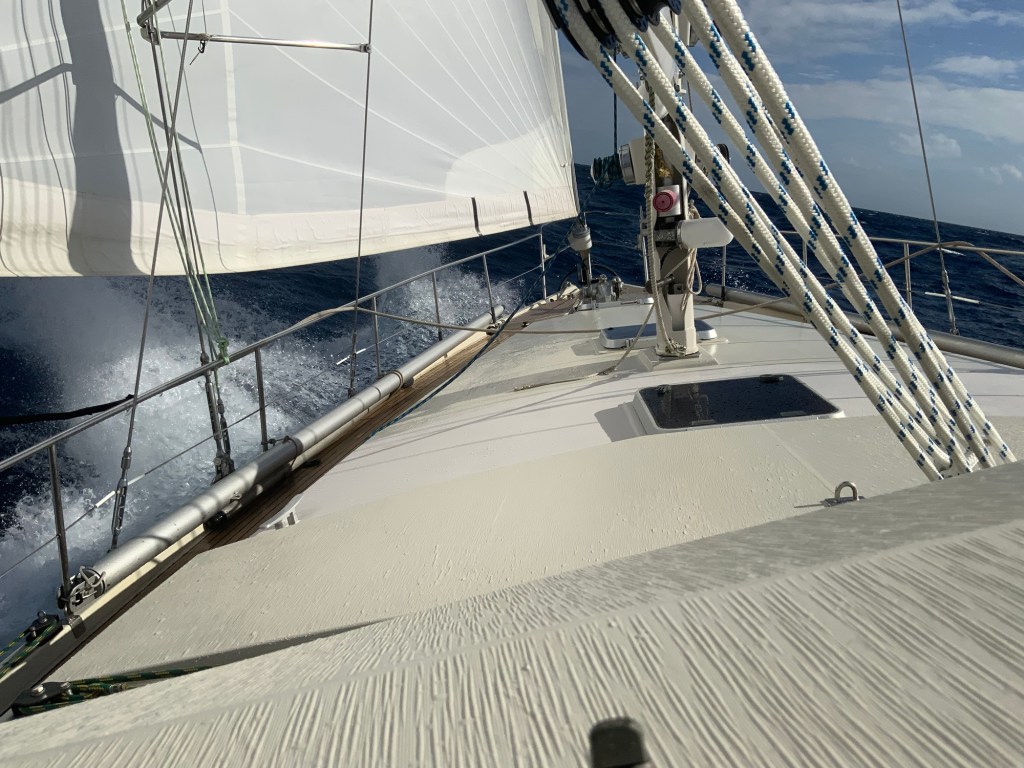
We’re now about 26 hours into it, and closing in on our destination. The boat is making good speed, close hauled, a smooth ride, although a bit wet on deck.
Harmonie has been waiting, patiently, for a bit of a break in the steady SE tradewinds so we can move to the southeast and Eleuthera. We have been tied to a dock at Lucaya in Grand Bahama, a very easy place to check-in to the country, and break for weather for a reasonable price.
Today, it looks like we catch a SMALL break with the weather, with the winds forecast to lighten up a bit, although mostly blowing exactly from the direction we want to go. We have about 24 hours of close hauled sailing ahead of us as we move toward Royal Harbor near Spanish Wells where we will be anchored for a few days while the next weather system passes through.
Under sail, crossing the Gulf Stream toward the Bahamas. Our passage was fast and fun. Once again, we ignored the advice of the local weather guru, and took our our council. We exited Port Everglades at about 4PM in a building Northwesterly wind, pointed the boat east, and took off. The wind varied from 9 knots to nearly 20. The ride was very comfortable, and Harmonie strutted her stuff making well over 8 knots through the water most of the way.
We arrived on the south coast of Grand Bahama Island quickly enough that we hove to, backtracking a bit, waiting for sunrise, before entering the channel. We tied up to the Grand Bahama Yacht Club to complete the check-in formalities with Customs and Immigration. The check in process went smoothly, as it always has for us.
By 11:00 we were tied up to Scarborough Docks where we met the crew on Harmonie’s sistership Idun to help her crew on a couple quick projects and later, dinner.
The local bay is either “Flamingo Bay” or “Bell Channel Bay” depending on which chart you look at. Getting in through a well marked channel is not hard, but the channel is not deep. The forecast height of tide at Freeport Harbor was 0.7 feet as we approached about 45 minutes before low tide. We saw a lot of depth readings of 7 feet. Since our keel is 6’6″ that’s pretty close, but you get used to it in these islands We did touch (gently) in one sandy spot just inside the entrance. You have not visited the Bahamas until your keel touches sand!
We had thought we would turn around and be out of here today, but, but we decided to hand for a few days and let the easterly trade winds moderate a bit for our next jump over to Eleuthera.
It will be a while before we miss the hustle and crowds of south Florida. Right now we do not have any specific timing for a return. We will be heading down south and east through the Bahamas, down the eastern Caribbean chain to Martinique. At that point, it gets a bit fuzzy. Right now our best guess is a jump to northern Panama.
Hopefully, we will have more interesting things to write about than (another) boat project!
Right now we are motoring away from the coast, looking for more wind!
We are in Florida. Fort Lauderdale, to be exact. Harmonie is docked up the New River in a canal behind a private house. We have been hustling to get a bunch of projects done, this time pretty much all “lifestyle” projects instead of functional ones.
A new mattress for our stateroom. The old one was… old. Having our old bones bounce down against the hard plywood underneath was no longer acceptable. We were replacing a ~10 year old polyurethane foam mattress, but ran into a problem. The thinest innerspring mattress we could find was too thick to allow use of the leeboards (that keep us in bed in rough sailing). To the rescue, a custom latex mattress about 5 inches thick. Hopefully many years of very comfortable resting!
New windows for the dodger. The hard plastic windows on the Amel dodger are a vast improvement over the soft vinyl windows use on a lot of boats, but even these have a finite life. I have a couple words of advice. The first time it even crosses you mind that the view thru the windows is looking a little “fuzzy” schedule to change them. Really. The improvement in clarity is breathtaking. Use acrylic (“Plexiglass”) not polycarbonate (“Lexan”), and choose clear, not tinted. The tinted windows are nice in the hot sun, but the reduction in visibility at night cancels all other benefits. There is a reason that cars are not allowed to have their entire windshields tinted! At the same time, we have a new lens to replace the one in the aft cabin hatch.
Our refrigerator in the galley has been struggling for some time. We have managed to drag it along, but the cost of diagnosis and repair outstrip a new unit by a significant margin, so a swap out has been arranged.
The BIG project is refinishing the cabin sole. Unlike a lot of Super Maramus, our cabin floor is wood. It had been refinished once before in its life, but the finish was thin, and had started to fail, and was looking pretty tired. We hired a local woman who had done some finish work for us in the past to do this project. As I write this we are a few days from completion, but the floors are looking SPECTACULAR.
In about a week, we will be back underway again, headed to the Bahamas where there is warm weather, beautiful, empty, beaches to enjoy, and fish to catch.
When you sign up for Starlink you have a choice of either a “High Performance” antenna, or the standard antenna that has somehow come by the nickname “Dishy”. Months ago it was announced that Starlink applied to the FCC for a license for a new “mini” dish, but as of this writing (Dec 2023) there has been a new antenna announced at the same price point as “Dishy” It is not yet clear to me if this is a replacement, or a line extension.
Here is how currently available options compare, as I see them.
High Performance
Dishy
$2500
$600
Easier to mount on any flat surface. A mast radar mount works well, and various arch mounts are also possible.
Potentially more complex solutions needed to assemble a permanent mounting. No single solution works on all boats.
Fewer short interruptions, might be important for people who need a very stable connection for two-way video feeds.
Performance is more than satisfactory for regular web usage.
About 50% higher power demand.
Currently lowest power option.
No modifications needed.
Best performance underway achieved with internal modifications that will void warranty.
Designed for use while moving, even at highway speeds.
Although not designed for use while moving, it does fine at normal sailboat speeds. Rumor has it that using it while moving voids the warranty, but I am not sure of that.
Connects to multiple satellites at once for a connection more reliable and less subject to obstructions and interruptions.
Only one satellite connection supported, so less power needed, but also subject to more interruptions.
There is not a simple “always correct” choice for a cruiser. If you are power limited, the “Dishy” option is likely your best choice. Putting together an elegant permanent mount of a Dishy can consume much of the cost difference between the choices, but if you use a simple mount, it is clearly the budget option. If you do not expect to use Starlink underway, the Dishy is easy to remove from a temporary mount and store away while you are sailing.
If your primary use is going to be remote work off grid, then the high performance antenna is likely to be your best choice. Maybe you can get work to pay for it, or at least get a tax deduction 😉
We went with the “Dishy”. We have not yet fully worked out how we are going to mount it in the long run, but its performance so far has been excellent for routine web browsing, at the dock and underway.
Router Information
Startlink Dishy comes with a WiFi router in an elegantly stylish case that plugs into 110/220V 50/60Hz. Mixed in with all the rest of the misinformation on the internet, I have seen people say this can only be used with a pure sine wave inverter. That is certainly not true. Ours ran fine on our ancient Xantrex 110V modified sine-wave inverter that was built in the last century. Will it work on your old inverter? Probably…
The Starlink router works fine, it is very simple to set up. If you can easily feed it AC power, you might be perfectly happy running it. We felt we could improve the integration of this part of the system into our boat’s systems.
Inside the sexy Starlink Router case are three things. A pretty generic WiFi router. An AC to DC converter to supply 48V DC to the Antenna, and a POE (Power Over Ethernet) injector. That’s it. No magic. I have put together a set of components to do exactly the same thing powered from our boat’s 24V DC system–no AC power required. Since we already had a DC powered WiFi Router onboard that was being used all the time, it did not make any sense to spend the power to run TWO routers, and especially since we could stop using the inverter to power the Starlink router..
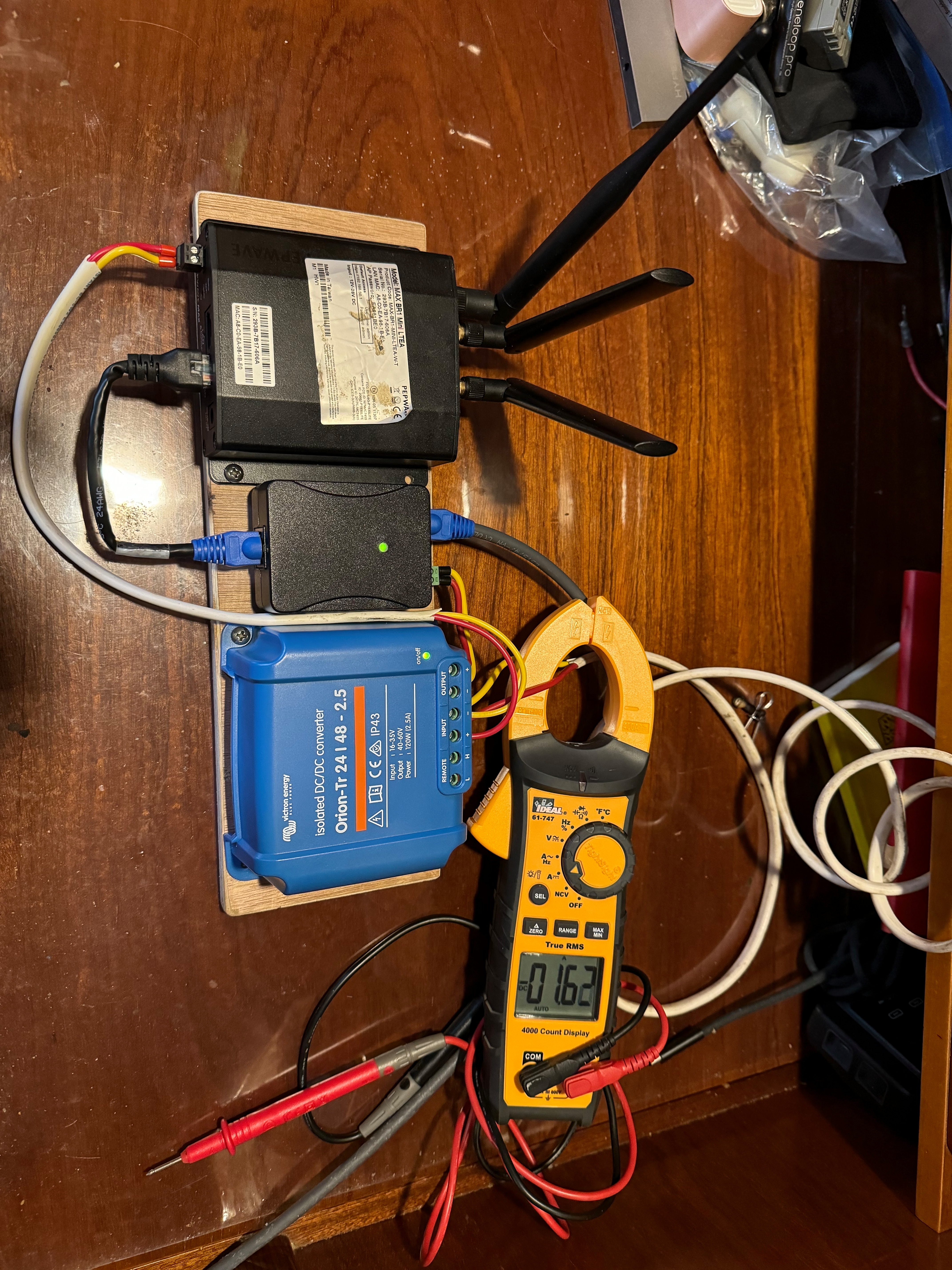
Here is a photo of the breadboard of the system as I assembled and tested it.
A 24 Volt to 48 Volt converter, a high voltage POE injector, and a Pepwave MAX-BR1-MINI-LTEA-W Router. The Starlink cable from the Antenna has been modified with a standard RJ-45 plug, and there is a “special adapter” cable between the POE injector and router. Starlink cabling standards are different than everybody uses, so be sure you get them right, and there were a few modifications to the Pepwave setup needed. (I’ll write that up shortly…)
For someone using Starlink as a primary connection for video conferencing, or other highly connection sensitive applications in an area they also have access to a marina WiFi, and/or a cellular data connection, a PepWave router is an awesome piece of kit. It can seamlessly switch from one data source to another, in a priority of your choosing. These things can do everything you ever imagined, and a whole lot more. A simple setup is pretty simple, but you can dive in as deep as you need. PepWave makes many different ones of different capabilities. If you need this capability, do what I did, talk to a networking expert who can help you make a selection, and the initial setup.
Despite what you might read on the internet, once configured properly, you WILL be able to fully interact with the Starlink antenna using the Starlink app with the generic router. If you are not a total network nerd, you might want to be sure that you use a router that you can confirm will work, and make whatever setup changes are needed. There are a few router specific functionalities that will disappear (Like the advanced speed test) but everything else works exactly as you expect.
Power Use
You can see in the above photo the Ammeter readout of the consumption of both the Starlink Antenna and the Pepwave router (1.62A) This number is highly dynamic, and varies from 1.3 A to 2.1A (All measured at 26.9 Volts). Using nothing more than my eyeballs to estimate it, an average use of about 1.6A or 1.7A (or, multiplying by 26.9V, 43W to 45W) seems like a good number to plug into an energy budget. The router by itself has a typical power draw of 13W. This is not a negligible power consumption, but not a huge one either.
All these numbers are for the “Dishy” antenna. I don’t have any measurements for the High Performance antenna. As minimum, I would expect the High Performance antenna might need a 24V to 48V converter with a higher rating that the 120W model I chose to power our Dishy.
I had no quick and simple way of measuring the energy use for the system when it was powered through the Starlink router, so I don’t have those numbers.
I have gotten a LOT of requests from cruising sailors who are new to Starlink about the details of how to set it up, what plan to get, how to manage the system, and many other questions. A short article seems the best way to address those instead of answering them one at a time. This article will discuss the types of plans available, and which one might be best for you. There is one answer that will be the best for ALMOST all cruising sailors, but, once you understand the details about WHY, you can make your own choice. Hardware issues on which antenna to use, and how to configure it for your boat will follow.
The day this box arrives on your boat will change the way you look at cruising. Mostly for the better.
This information is current as of November, 2023. It is most certainly NOT official Starlink policy, but is my understanding of the rules and how they impact us sailors. I am not an expert, but I have done a pretty deep dive into this. I am sure I got something at least partly wrong, but I am also sure that the internet being what it is, that will be pointed out to me! One more caveat, this is written from the perspective of someone with a home address in the continental USA. Prices ARE different in different parts of the world, and policies might be as well, so extrapolate with care.
With those caveats out of the way, let’s dive in. Don’t worry, the water is not too deep…
Before we can understand our choices we have to know what they are, and to understand that we need to have a peak behind the curtain at Starlink’s business.
Lost in Space
If there are any communication engineers out there, please forgive the gross simplification of this section. I think it has enough information to get the concepts clear, but no more…
The basic concept for satellite communications is pretty simple, you send information up into the sky, the satellite receives it and sends it back to a ground station connected to “The Internet.” Information coming back you makes a similar trip, from the ground station up to the satellite and then down to you.
This was the standard way most satellite systems worked because their satellites were high in the sky, and pretty much everywhere on earth they could “see” you AND a ground station. Only a few complex, high powered satellites are needed to cover the entire globe. The downside of this system is the time it takes for the signal to go up to the satellite and back down can be long–up to a quarter of a second. For internet data, and even for phone calls that is about three forevers.
Starlink’s big difference is the satellites are in very low orbits, about 340 miles, compared to over 26,000 miles for some other communication satellites. So the round trip signal delay is trivial. This comes with a couple of complications caused by the low orbit. Each satellite has a very limited view of the world, so you need a lot of them. Fortunately, because each satellite sees fewer customers at a time, they can be smaller and simpler. This limited window down to the earth’s surface causes another issue for customers in places where there is not a ground station within view of the satellite they are sending their data to. Without a ground station, you can not send and receive data.
Starlink solves this problem with laser communication between satellites. You send an email to your Mom while you are sailing in the middle of the ocean, and it goes up to a satellite, and bounces from one to another as laser light, until it gets to one that can see a ground station, and then over traditional methods to your Mom’s computer. Pretty slick. But there’s more…
This laser link is very fast. Actually faster (by a little tiny bit) than sending the same data through a cable. So someone sending stock trading information from London to Wall Street with a Starlink connection will have their data arrive a few milliseconds before his competition using the undersea cable connections. In the world of high speed trading, milliseconds are big bucks, so this data stream is VERY valuable property, and is therefore expensive. It is likely a very significant part of Starlink’s revenue.
That’s all nice, but how does it affect us poor cruising sailors??? Read on…
Kinds of Data
N.B.: For non-commercial customers Starlink offers three kinds of data at different priorities, and different prices. In the Starlink documentation and on their website they don’t always use the same terms for the same thing. I have tried to be internally consistant in this article, even if my terminology might occasionally disagree with exactly the way Starlink phrases things in some places. This is especially true with data plans.
If you have a residential account, your system is usable only at a single location. Your data is middle priority. We do not care about this type of data, because it is not useable on a boat that is moving around.
The other types of data are “Roaming” and “Priority“. Roaming data is not not connected to a single location, but it is the lowest priority on the system. Roaming data can not be used while “moving” or while not “on land.” Starlink defines “moving” as more than 10 miles per hour. The definition of “on land” is a bit more complex, but it appears to extend to about 15 to 20 miles off shore. We have reliably used Roaming data while sailing, docked, and anchored in coastal waters, including all of the Chesapeake Bay. We don’t normally exceed 10 miles per hour (~ 9 knots).
Priority data is (as you might guess) the highest priority on the system. Users with lower priority plans will have their data slowed down if it conflicts with yours. It is usable anywhere in the world, because it is the only data that is able to be sent by the laser satellite links, Starlink’s most valuable bandwidth. For all these reasons this data is the most expensive data on Starlink’s menu.
De Plan, Boss! De Plan!
When you go to the Starlink website and go to the page for “Personal” users, you will see three prominent choices: RESIDENTIAL, ROAM, and BOATS. Let’s ignore the RESIDENTIAL menu, because we want our Starlink to roam the world with us, not sty at home. So let us start with the various plans under the ROAM menu, and dissect who might be best served by each of them.
MOBILE REGIONAL: Currently $150/month. Unlimited Roaming data on land, NO access on the open ocean. Coverage is anywhere in your “home continent.” Starlink defines this a bit different than your old grammer school geography book. If you had your Starlink delivered to an address in the USA your “home continent” is North America, which includes all of Central America and the Caribbean. For many cruisers, this is the plan they should start with, and might be the only one they ever need.
Be aware of where you home continent is, and when you might be leaving it.If you are planning on leaving your home “continent”–say crossing the Atlantic–you should get a global plan BEFORE you leave.
MOBILE GLOBAL: Currently $200/month. This is identical in capabilities and restrictions to the Mobile Regional plan, but is available everywhere in the world that Starlink is allowed to operate. For most cruisers, this is the best plan once they travel outside of their home continent.
MOBILE PRIORITY: Currently $250/month. This is a plan that sounds great for a cruising sailor on first hearing, but there is a “gotcha” in it that you need to be sure you understand. It includes 50 GigaBytes of “Priority data” that can be used anywhere in the world, including offshore, and unlimited Roaming Data that can be used anywhere in the world on land. Sounds great, right? The catch is that the 50GB of Priority data is ALWAYS the first data you use, even if you are anchored in a place Starlink considers “on land.” If you chew through more than 50GB of data in a month, it might be the case that you have no more Priority data when it comes time to lift the anchor offshore. That extra $100 then has not actually bought you anything useful. If you use very little data when you are on land, and want Starlink just for offshore communications, this might make sense. But on our boat, if we are doing our normal things, we can consume 5GB in a day, so for much of each month we would NOT have Priority data available to us.
I hear the questions now… what about the BOAT Plans? Are they not the best? Well… if you have a super yacht with a super thick wallet, yes probably. Let’s take a quick look at these:
First is MOBILE PRIORITY, that is the same as describe above, and has the same issues. The other plans are the same, but offer higher amounts of Priority data, for a LOT of extra money. For example, the next one gets you 1 TeraByte of data in a month for $1,000. That’s a LOT of data, and a LOT of money. It might make sense for someone who needs a connection for video conferences and the like while offshore, if the job pays very well 🙂 Most cruising sailors don’t need this.
But I Want to Use it Offshore!!!???
So if you have the MOBILE REGIONAL or the MOBILE GLOBAL which come only with Roaming data how do you connect to the internet when you are offshore? Not to worry, there is an answer for that. You can temporarily turn on Priority Data that will allow you to use your system while out on the ocean, and while moving at speeds greater than 10 miles per hour. This is billed in addition to your normal monthly plan at $2/GB. This is turned through the Starlink website (NOT the app that controls the antenna!). It will be most seamless if you do this before you leave where Starlink considers “land”. It’s not obvious how to do so…
Log into your Starlink account on the starlink.com webpage. Go to “My Account” You will see a list of “Your Starlinks” Probably just one there… Click on the box that says “MANAGE” On the chart that shows your data usage, you will see a toggle for Mobile Priority. Turn it on before you just before you go offshore, and when you are back to “land” turn it off.
Starlink gives little or usually no documentation about how things work, so we are left to wonder, and wander around and find things for ourselves. Here are a couple of discoveries.
If you move from “land” to “the ocean” while still connected to your roaming data, the option to enable Mobile Priority data will appear on your connected app. If you need to re-engage with the satellites, it can take a LONG time to do so, like an hour or more. be patient, you will get seemingly random error messages while the Antenna tries to figure out where it is, and where a satellite is located that it can talk to.
Once you turn on Mobile Priority data the option to turn it off will disappear until you are back “on-land” again. This can cause confusion, but it makes a kind of sense. If you want to stop using Priority data, you simply have to turn the system off.
If you turn off Starlink to save power while you are moving, it might take a long time to reestablish a connection if it is in a different place than when it was shutdown. Based on experience it seems longer if you are still moving. An hour is not unexpected. Be aware of this, and be sure to give it time to reacquire satellites before you start panicking and making random changes.
For reasons that are not entirely clear to me, when Mobile Priority data is ON and the boat is moving, the antenna will usually orient itself to a horizontal position.
Note: Because this is so complex and situational dependent, you will find a lot of people posting advice on the internet who don’t really understand what’s going on, and make up reasons that might sound good, but are wrong. Consider any advice you get (especially from on-line forums) to be suspect until you know for SURE. That includes my stuff, by the way!
What happens if I forget to turn Priority data on?
If you get offshore, and want to connect, your Starlink will not allow it. All is not lost, however, it WILL let you connect to the Starlink website, where you can toggle Mobile Priority Data on. When you turn on your Starlink system some distance away from where it was last active, it can take some time (an hour!) before it gets a satellite link. Be patient. Once you have a connection, the switch to a full connection happens very quickly after you make the change.
What happens if I forget to turn Priority data off?
Your bill can get very large, very quickly if you are a heavy data user. $2/GB adds up very fast if you are doing video conferences or movie streaming. Don’t forget to turn this off if you are not using it!
Yesterday’s trip down the lower Chesapeake could easily have been described as an easy, relaxing sail. Today has been much more serious sailing.
The forecasts have been spot on, with winds from the north at 20 to 30 knots, and we have been making excellent speeds through waves that have sometimes been quite lumpy.
Right now, Cape Lookout is abeam, the wind is straight out of the north at 20 knots, and we are making almost 8 knots over ground. Our last navigation hazard is Cape Fear and it’s of flying shoals about 80 miles ahead. We are expecting the winds to pick up again tomorrow morning, and we should be pulling into Brunswick in about 36 hours.
These short passages are tough. We never quite get into the rhythm of watch standing, so they are in some ways more tiring than much longer ocean passages. Other than that, the boat is doing great, and everything looks good.
We have passed the Chesapeake Bridge-Tunnel and are now officially in the ocean. The winds have clocked a bit, and we are on a comfortable beam reach passing Cape Henry, headed for Cape Hatteras. For the next hour or two we still have the challenge of negotiating the zone of heavy commercial ship traffic headed in and out of the bay.
Right now it’s a beautiful evening, easy comfortable sailing with winds from the WSW at 10 to 12 knots. Over the next few hours the winds are forecast to clock around to the north, and pretty much stay there for the next couple days. Our routing software predicts our arrival in Brunswick in 3 days, a very fast trip.
As I write this we are motoring south on the Chesapeake Bay, headed toward the Atlantic Ocean. Right now the wind is from the south, pretty much directly on our nose. It’s sunny, and warm, but that kind of pale, thin sun that has more in common with January in Maine than July in Florida. That will change by tomorrow afternoon, when then wind will shift to the north, bringing clouds, rain and temperatures at least 20 degrees colder.
If the forecasts are accurate, the north winds will continue for most of the week, and will carry us on a wild sleigh ride right down to our destination in Brunswick, Georgia.
We had a fun few weeks in Annapolis. Helping some people with their own boats, squeezing in a delivery or two, and finding time to replace Harmonie’s main engine exhaust hose, checking her engine alignment, and of course the fall boat show.
Sailors are famous for being conservative about making changes. When you are far offshore and away from help and supplies is not the time to try new things. We finally broke down and got a Starlink. So far, we have found it exceptional. This will be our first offshore trip with it, and we expect it to perform well.
With the idea of ultimately decommissioning our Iridium Go system now that we have a Starlink we have begun using a new system for posting our position and tracking information. You can see it here:






 fetchinketch